Skip to content
Contact Us
Start a Project info@nexlavision.com
NexlaDoc
NexlaDoc · Document ManagementReal screens

Document management system built around your business records

NexlaDoc is a dynamic document management system. You define the document types and the fields that describe them; documents attach to the customer, supplier, employee, vehicle or contract they concern, route for approval, get signed, and tell you when they are about to expire — with a complete record of who did what. In the browser, in Arabic or English.

What happens next: we reply by e-mail from info@nexlavision.com within one business day to arrange your NexlaDoc demo. Prefer to talk? Call +92 321 4184187.

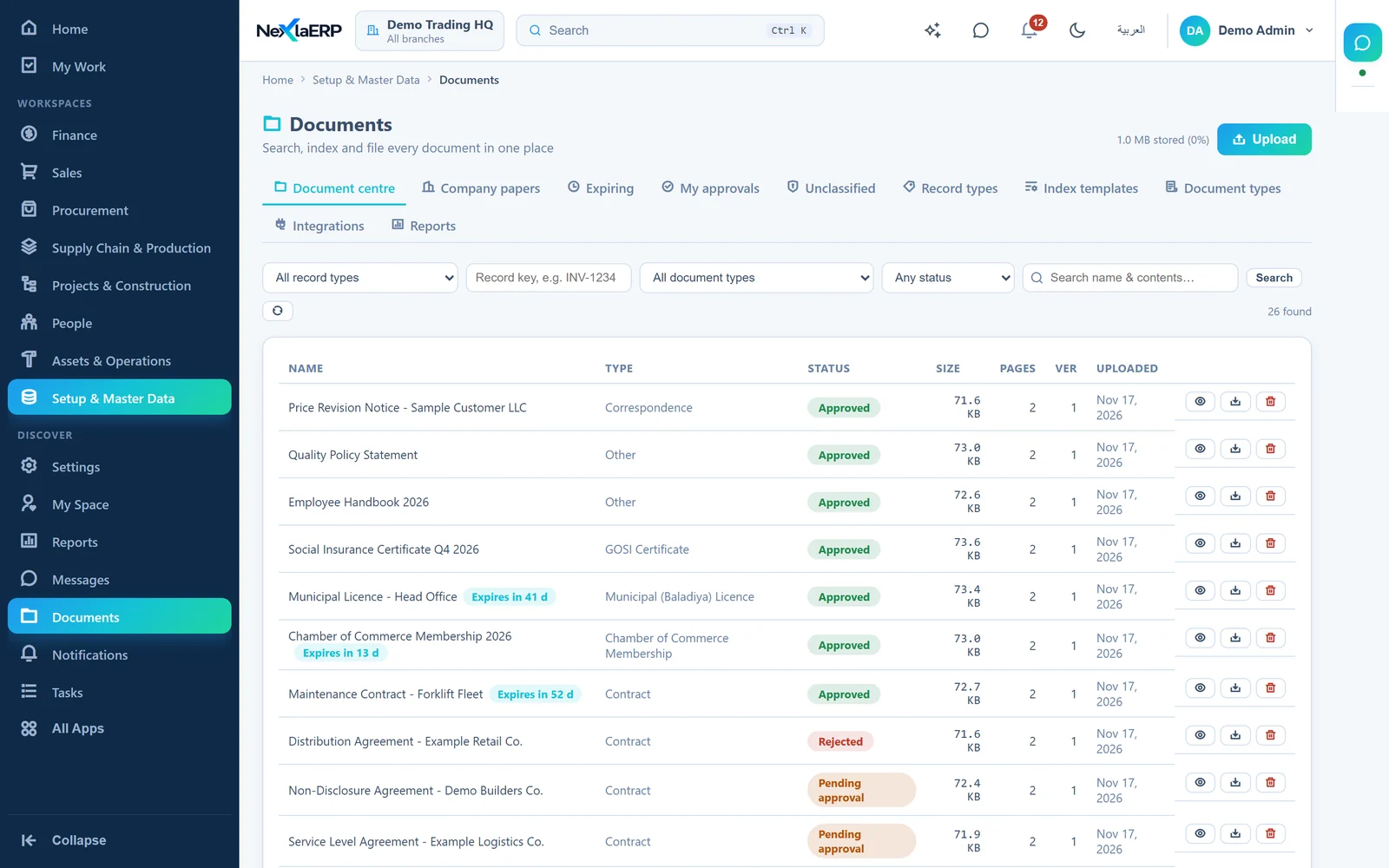
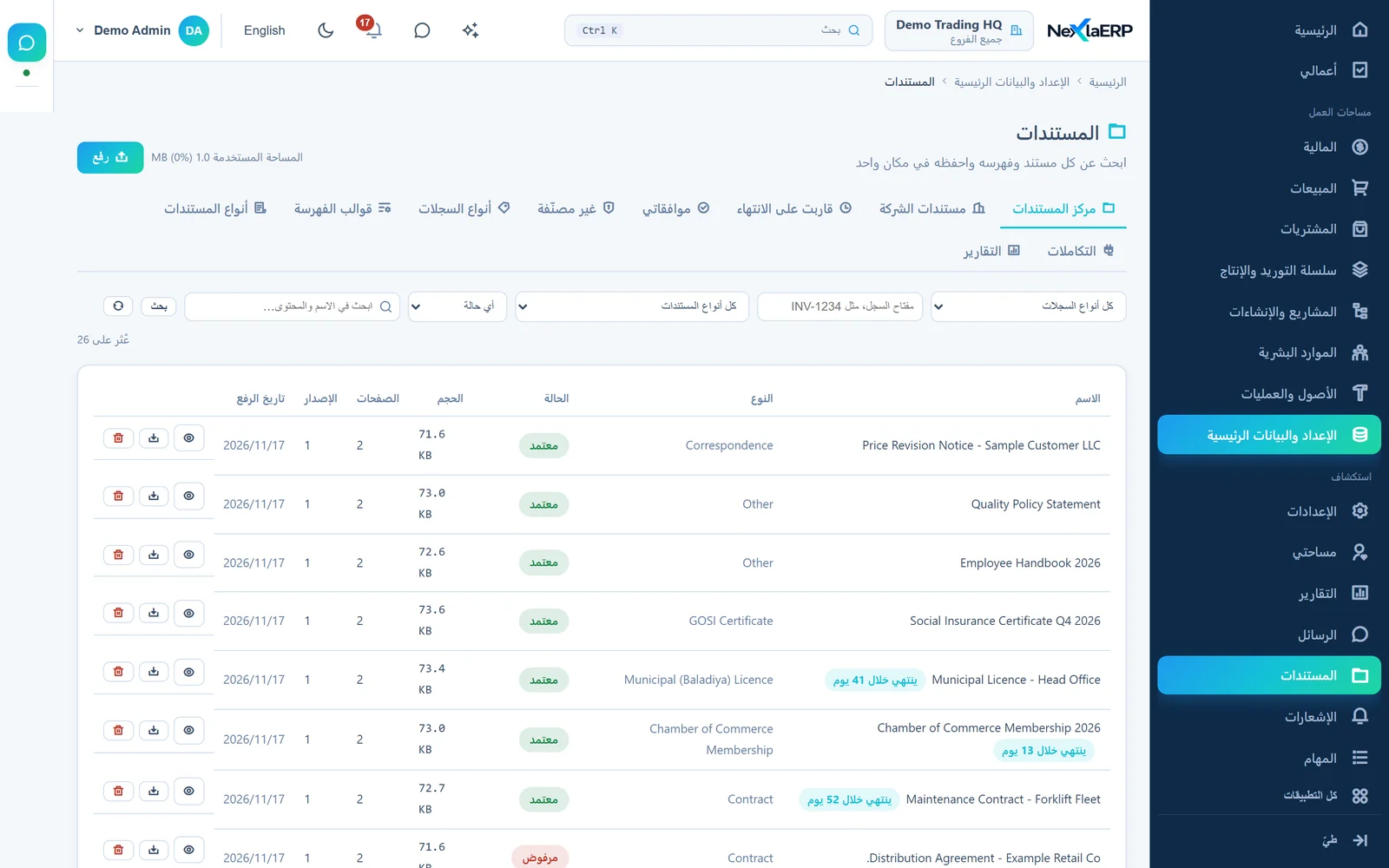
NexlaDoc document centre list with document names, types, approval status, size, pages and versions.
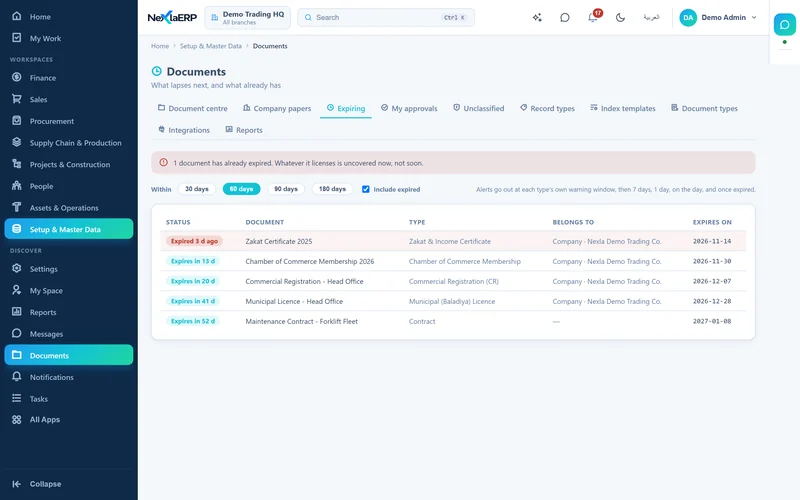
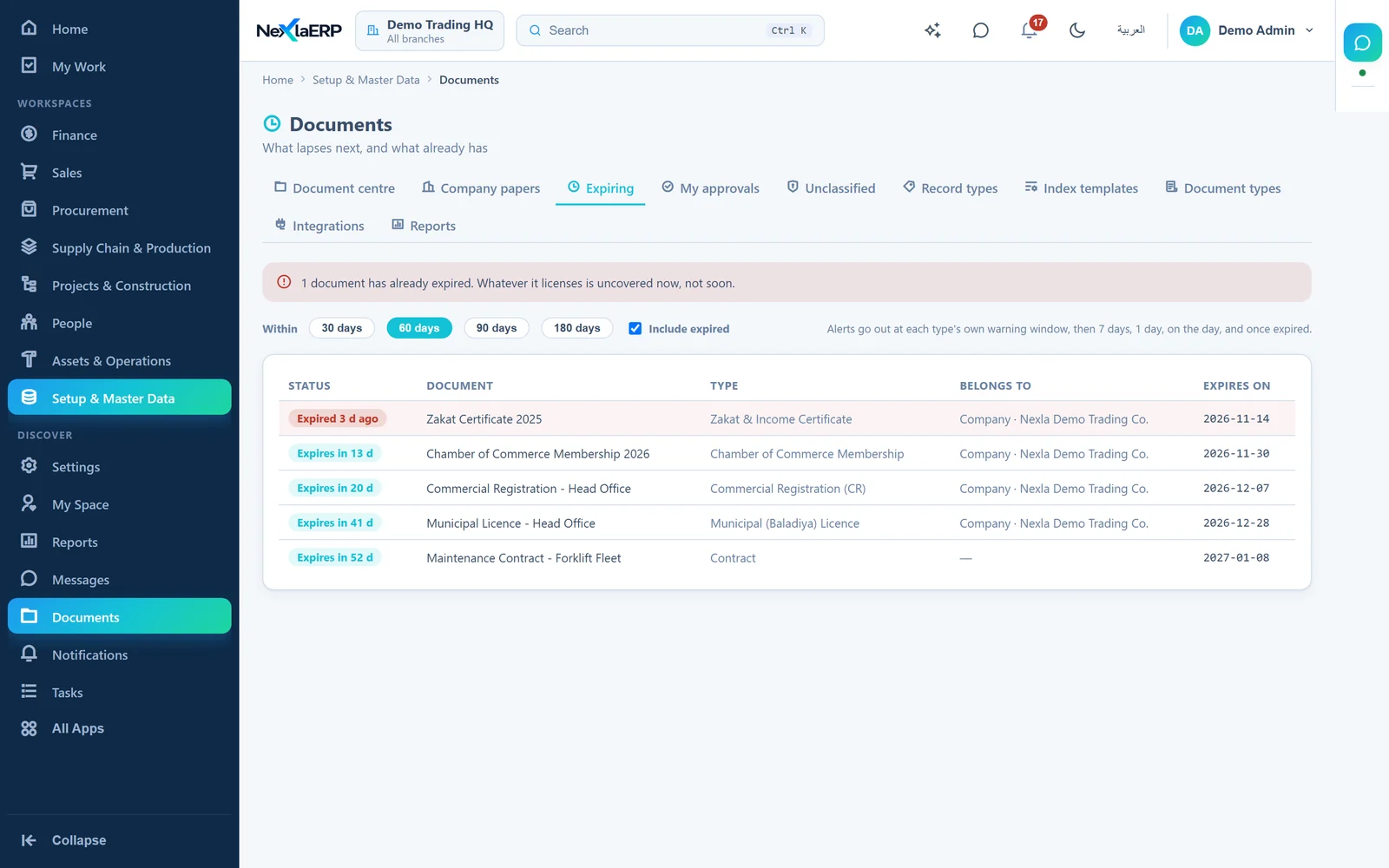
NexlaDoc list of documents that have expired or expire within sixty days, with days remaining.
Real screens · demo data
Your document typesTypes and index fields are configuration, not a code change.Dynamic
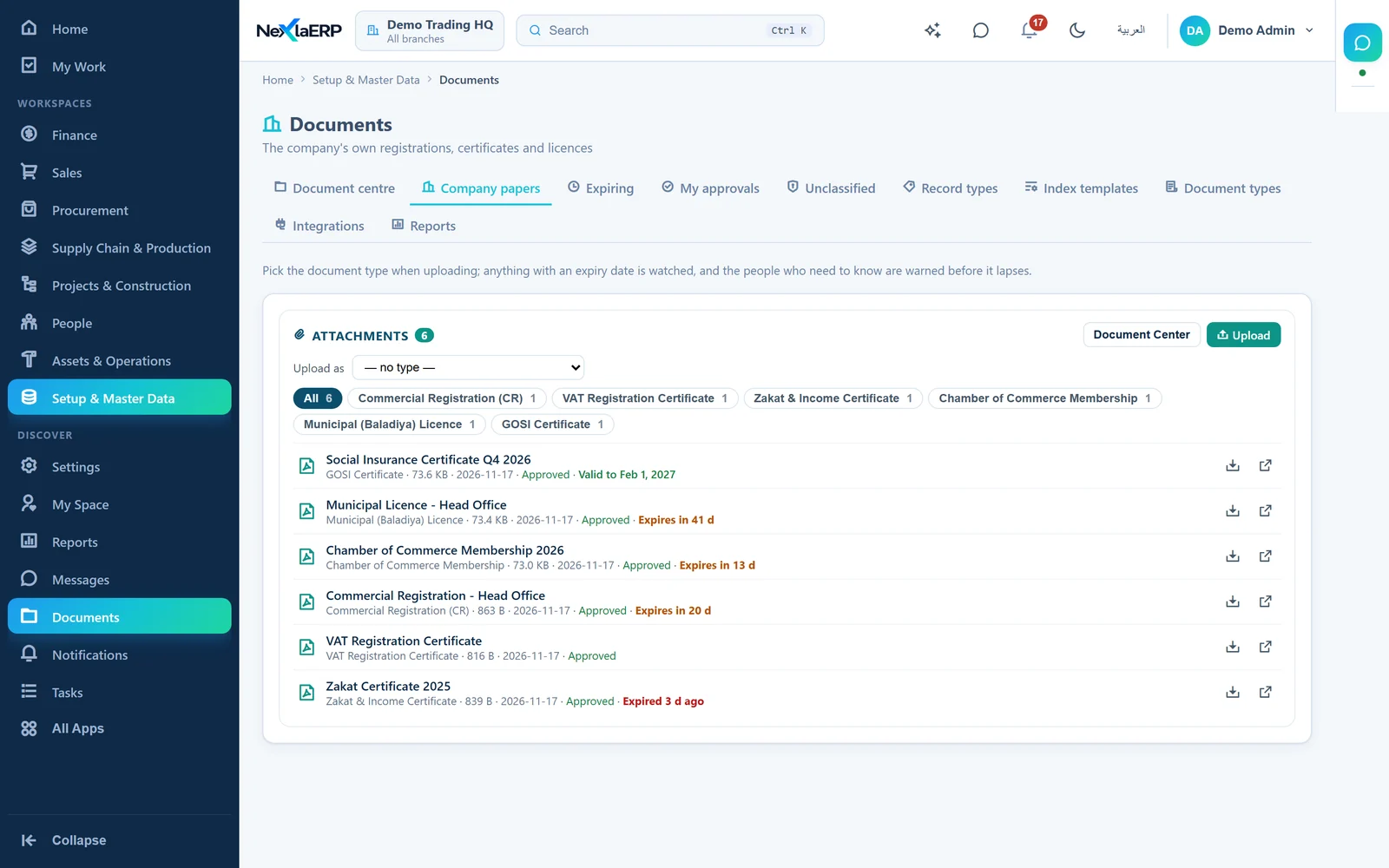
Filed against recordsOne document can belong to several records at once.In context
Nothing lapses quietlyExpiring licences surface before they stop a shipment.Ahead of it
ProvableApprovals, signatures and an audit trail on every action.Defensible
Inside NexlaDoc

See every document, version and approval

The document centre lists every document with its status, version and expiry; a document's own page carries its approvals, signatures and versions.

01Document centre. Every document with its type, status, version and expiry.
NexlaDoc document centre list with document names, types, approval status, size, pages and versions.
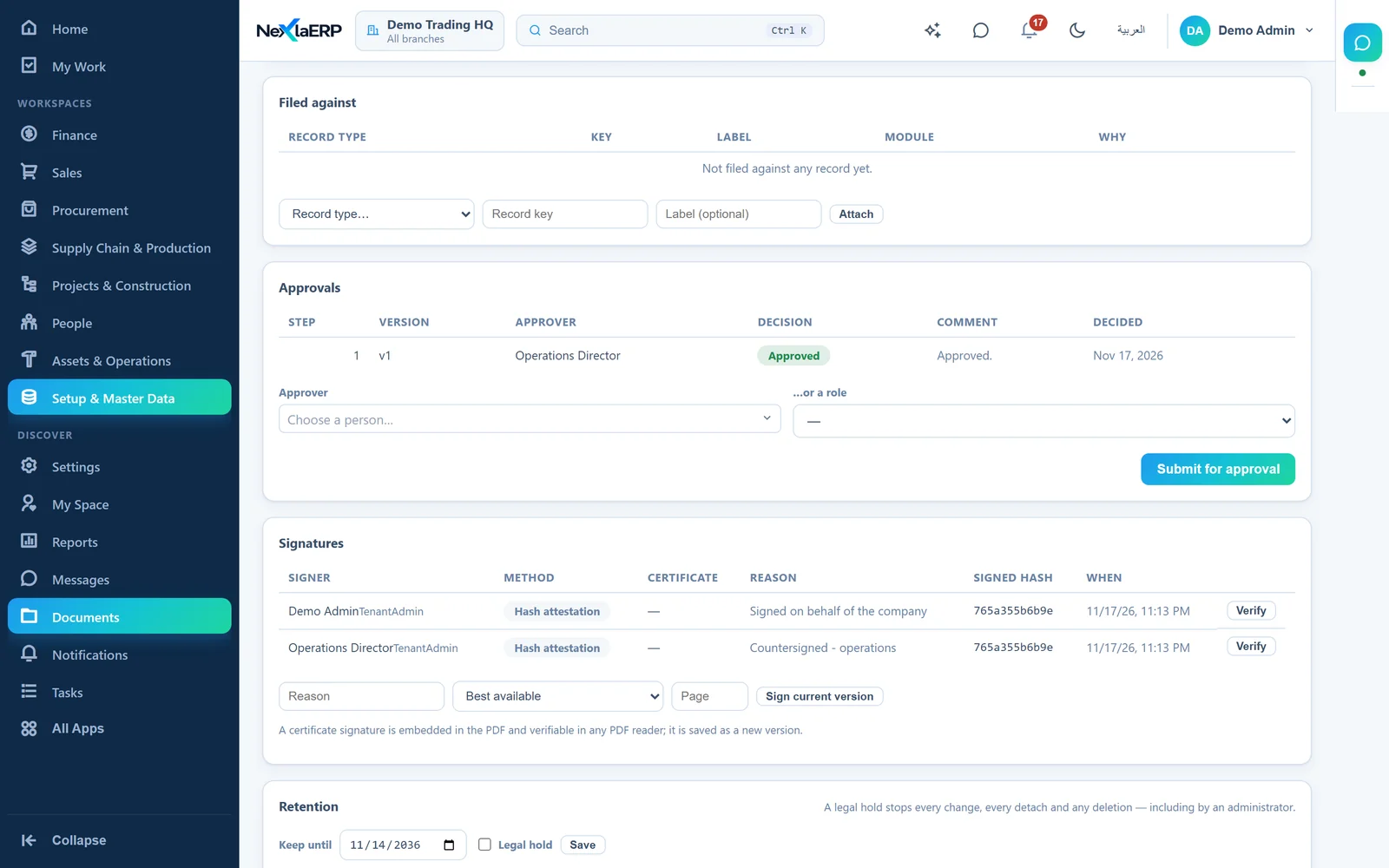
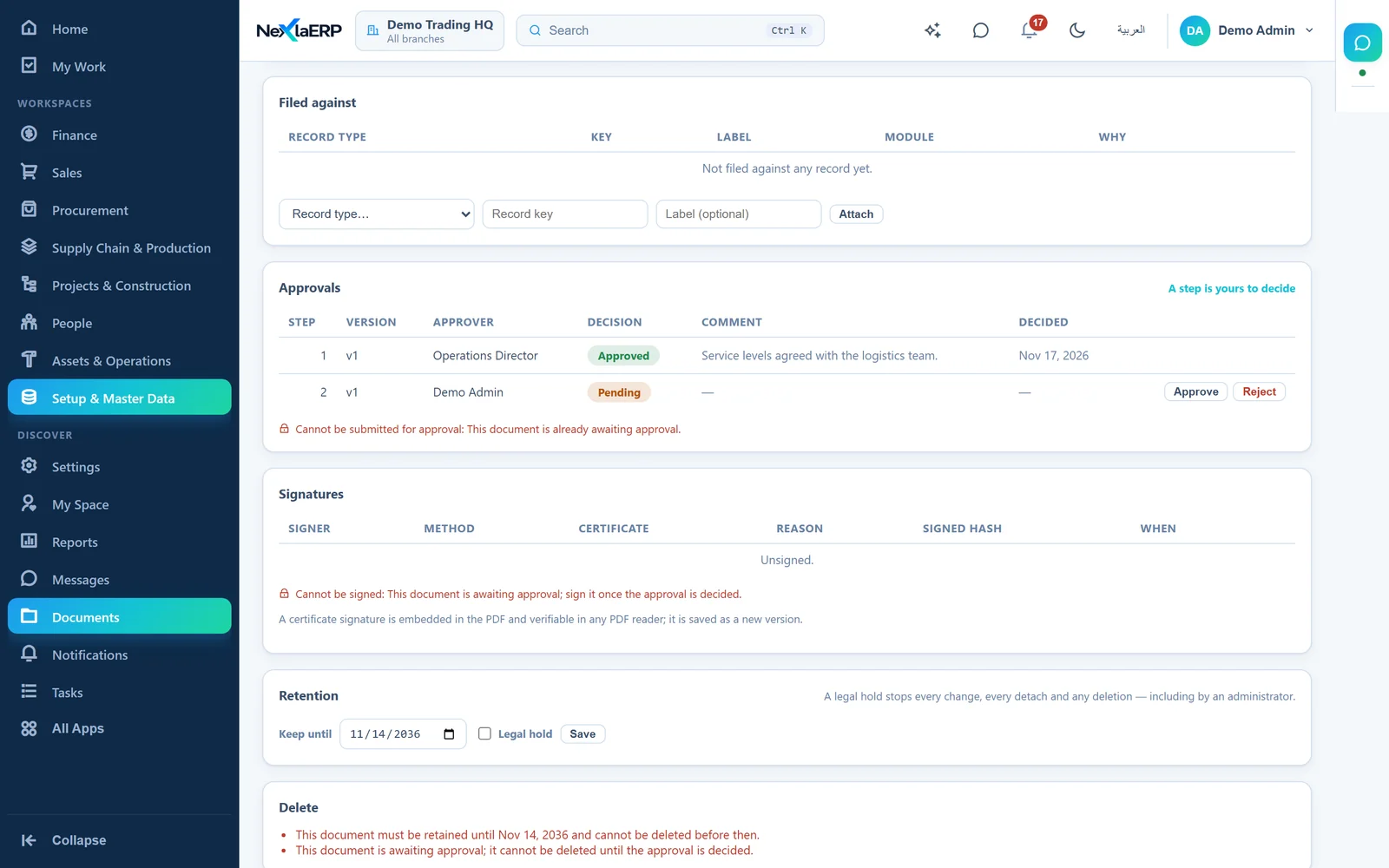
02Approval and signature. Who approved which version, who signed it and the hash each signature covers.
NexlaDoc document page showing an approval step, two signatures with method, reason and signed hash, and retention.
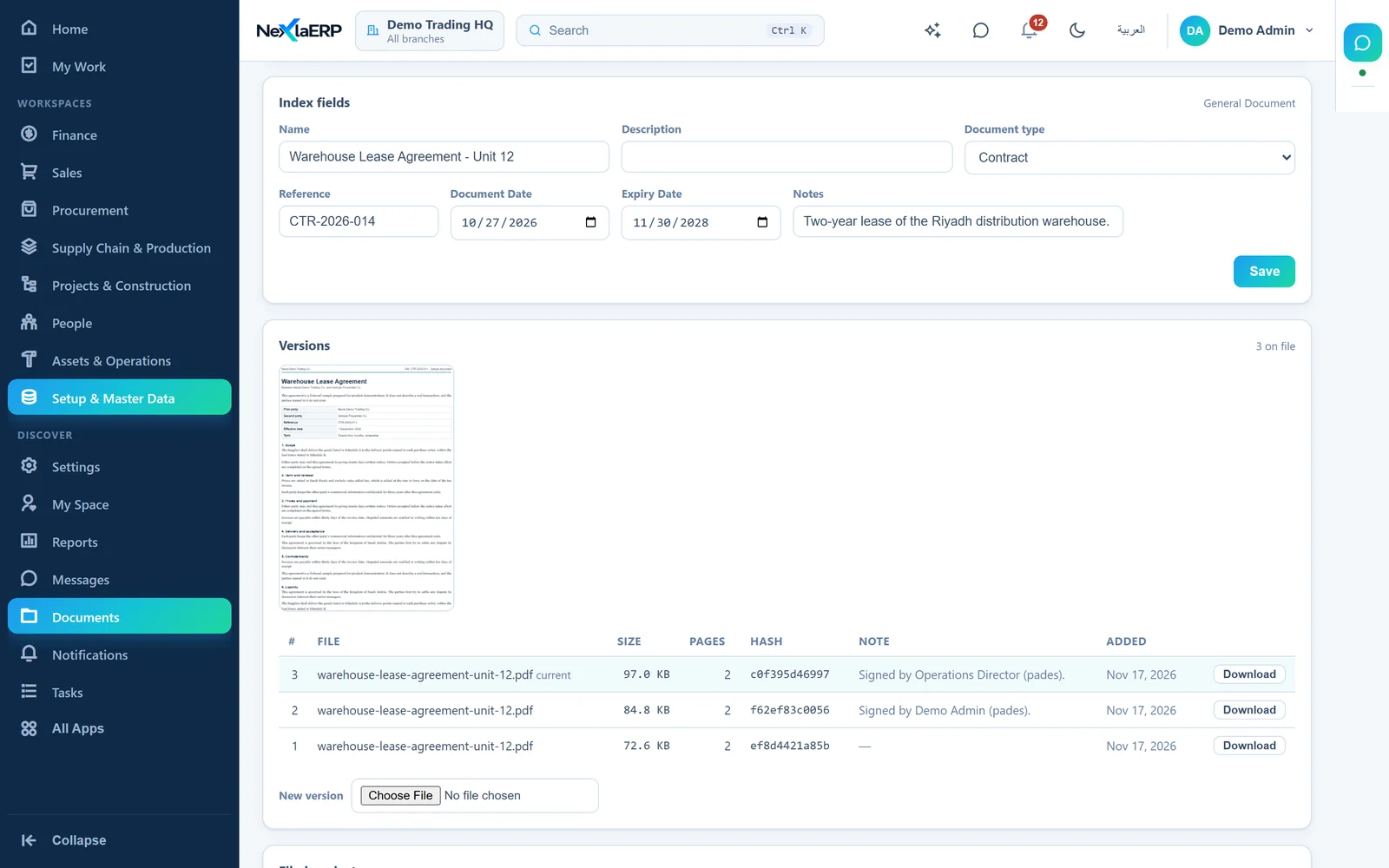
03A document and its versions. Index fields, a preview and one version per signature.
NexlaDoc document page with index fields, a page preview and three versions, two of them created by signatures.

Real screens of the product, recorded with demo data.

Capabilities

A filing system that knows what it is holding

Most document systems store bytes and leave the meaning to whoever named the folder. NexlaDoc holds the meaning too — what the document is, what it relates to, who accepted it and how long it stays valid.

What it is

Document types you define

Create a document type with its own typed, validated index fields — a policy number, a plate, an issuing authority — and start filing against it immediately. Retiring a field leaves the documents that already carry it untouched, so yesterday's records stay readable.

Attached to the business record

A document belongs to a supplier, an employee, a vehicle, a contract — often more than one at a time. Register a new attachable record type as data, without a release, and documents can attach to it. A panel on the record's own screen is added module by module.

Versions, and an edit lock

Every replacement is a new version and the earlier ones stay retrievable. An edit lock stops two people producing conflicting versions of the same document at the same time — the ordinary way a signed contract quietly becomes two.

Who accepted it

Approval chains

Route a document step by step to the people who must accept it, by name or by role. Steps are decided in order, the queue shows what has been waiting longest, and a rejection settles the document rather than being overtaken by a later approval.

Signatures that can be re-checked

PAdES embeds a certificate signature in the PDF; where no certificate is configured, a content-hash attestation records what was agreed. Either can be verified again later against the bytes as stored, and the signature status report shows documents changed since signing.

A trail, and what it costs you

Every action on a document is recorded — who, what and when — as the compliance trail. Alongside it, storage by document type and by linked record, counting every version rather than only the current one, so the bill has an explanation.

How long it stays valid
The expiring view

Expiry before it bites

Trade licences, insurance, visas, calibration certificates. Anything with an expiry date appears in the expiring view — due within your chosen window, soonest first, with the already-lapsed included by default, because the one nobody noticed is the one that stops a shipment.

Retention, disposal and legal hold

Give a document a disposition date and it appears when it is due for disposal, with its stored size. Deletion is a soft delete, and the files stay in storage. Place it under legal hold and it cannot be deleted by anyone until the hold is lifted — which is the point of the feature.

Webhooks and API keys

Your systems are told when something happens, with a signed payload, a delivery log showing the exact body, status code and last error, and a replay for the one that failed while your receiver was down. Scoped API keys let applications file and fetch directly; the secret is shown once and never stored.


What it is

What a document management system does

A document management system (DMS) is one controlled place for the files a business has to keep. It records what each file is, which version is current, who approved it and how long it stays valid. A shared drive only records where someone saved it.

1. Define

Create your document types and the fields that describe them, such as a policy number or an issuing authority.

2. File

Upload a document and attach it to the supplier, employee or vehicle it concerns, or to several at once.

3. Approve and sign

Route it step by step to the people who must accept it, then sign it with a certificate or a content hash.

4. Keep it current

Each replacement becomes a new version, and anything with an expiry date shows up before it lapses.

Who uses it

One document system for every team that holds paperwork

Finance and procurement

Keep supplier documents, tax registrations and agreements with the supplier they belong to, and route them for approval before they are relied on.

HR

Hold IDs, visas and employment documents against each employee, and see which ones are coming due.

Fleet and operations

File licences, insurance and calibration certificates against the vehicle or asset, with each expiry in one view.

Compliance and legal

Set retention dates, place documents under legal hold and show who did what from the audit trail.

Regional compliance

The paperwork each market expects, already listed

Every market has a set of documents a business is simply expected to hold, and the cost of learning that list is usually a penalty. NexlaDoc ships the compliance document types for Saudi Arabia, Pakistan and the UAE — commercial registration and Zakat certificates, NTN and sales-tax registration, trade licences, establishment cards, national IDs and driving licences.

Adding a market's pack marks which types you already hold and creates only the ones you do not, so nothing is duplicated. From then on they behave like any other document type: indexed, attached to the record they belong to, and watched for expiry.

Saudi Arabia

  • commercial registration
  • Zakat certificate
  • VAT registration
  • Iqama
  • municipal licence

Pakistan

  • NTN and STRN certificates
  • CNIC
  • chamber membership
  • SECP incorporation

United Arab Emirates

  • trade licence
  • establishment card
  • national ID
  • VAT registration

Arabic and English throughout, right-to-left where it belongs.

Architecture

Uploads go straight to storage

Uploads use presigned URLs straight to object storage, without being relayed through the application, which is what keeps a hundred-megabyte drawing from being a hundred-megabyte request — and keeps the service quick when several people file at once. People's downloads pass through the service, so access is checked on each read.

NexlaDoc is multi-tenant to its foundations: every document, type, template and key belongs to one tenant, and the separation is enforced in the data layer rather than remembered in each query.

Runs with NexlaERP, or on its own

Inside NexlaERP, records such as suppliers, employees, assets and purchase orders have a document panel, and the expiry view becomes one more thing the business is watched on.

Standalone, it serves any system that can call an API: your existing ERP, a CRM, a portal your customers upload into. The webhooks and API keys exist precisely so it does not have to be the centre of anything.

FAQ

NexlaDoc, answered

Software that stores business documents in one controlled place, with their versions, approvals, access and retention tracked. NexlaDoc is a document management system that also attaches each document to the business records it concerns.

A document management system built around your business records rather than a folder tree. Documents are attached to the customer, supplier, employee, vehicle or contract they belong to, carry typed index fields you define, and can be searched on those fields.

A shared drive stores files. NexlaDoc knows what a file is, which records it belongs to, who approved it, who signed it, when it expires and when it may be destroyed — and keeps a record of every action taken on it.

Document types, index fields and the record types documents can attach to are all configuration, not code. You add a new document type with its own validated fields and start filing against it the same day — no release required.

Yes. Any document can carry an expiry date, and the expiring view lists what falls due within a chosen window, soonest first, including anything already lapsed.

Yes. PAdES embeds a certificate signature inside the PDF; a content-hash attestation is available where no certificate is configured. Signatures can be re-verified against the stored bytes, and a report shows documents changed since signing.

Yes. A sequential approval chain routes a document step by step, each step decided by a named approver or a role, and earlier steps must be decided before later ones.

Yes. Webhooks notify your systems on document events with a signed payload and a delivery log you can replay, and scoped API keys let your applications file and fetch documents directly.

It does, and it also runs standalone. Inside NexlaERP, records such as suppliers, employees, assets and purchase orders have a document panel. On its own, it serves any system that can call an API.

Bring us your filing cabinet

Tell us the documents your business has to hold and what they attach to, and we will show you the types, the index fields and the expiry view set up on your own paperwork.

What happens next: we reply by e-mail from info@nexlavision.com within one business day to arrange your NexlaDoc demo. Prefer to talk? Call +92 321 4184187.

Free consultation

Free Consultation Available

Looking for a document management system?

Leave your name and number and tell us which product you are looking at. We will call or message you to understand what you need and prepare a quote.

Include the country code, for example +92 300 1234567

or

  • No obligation
  • English and Arabic
  • Six products